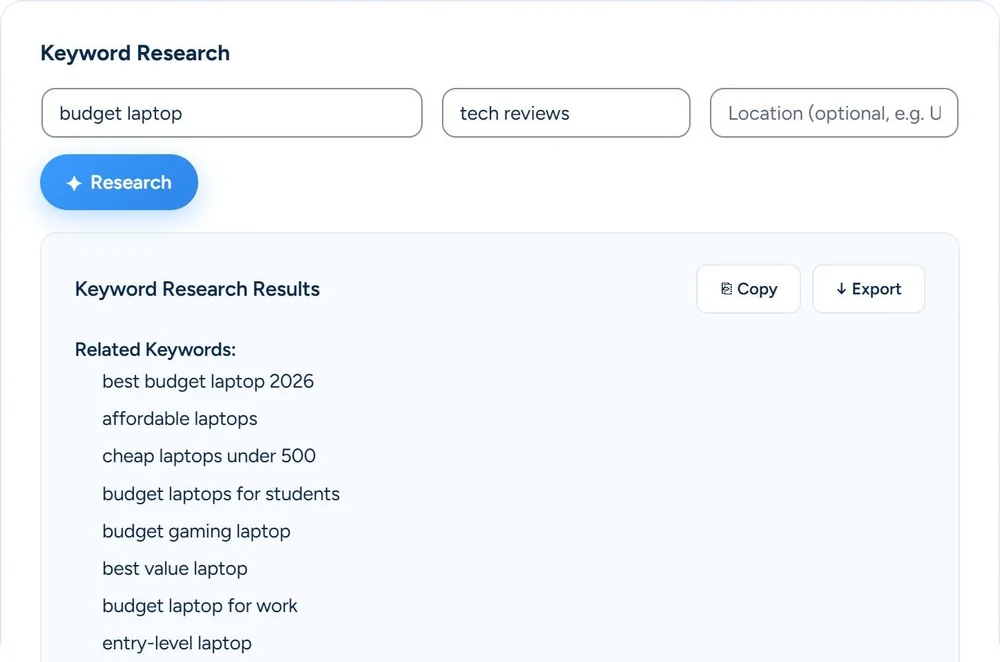
Enter a seed topic. Your AI returns related keywords, long-tail variations, the questions people ask and content gaps. Put the keyword you pick into the outline generator and you get headings, three title options and a meta description. One click turns it into a draft post. These are ideas from the AI you connect, without search volumes or rankings.
You open the editor with a topic in your head and no idea which angle to take, or which questions to answer. So you either guess, or you lose an evening to keyword tools that were built for full-time SEOs. The blank page stays blank.
An interactive preview with sample data. The real thing runs inside your WordPress admin.
One place for related keywords, the questions people ask and a structure. No tab-juggling.
Run it on OpenAI, Claude, Gemini, DeepSeek, Mistral, Groq, Grok, OpenRouter, Kimi, or any OpenAI-compatible service on a public HTTPS address.
You bring your own API key and pay your provider directly.
Create Draft turns the outline into a WordPress draft post, with your target keyword as focus keyword and the meta description filled in.
Turn one vague idea into a set of keywords, questions and a post skeleton before your coffee cools.
Collect the words and questions around a category, then outline category and buying-guide content around them.
Go from one seed topic to keywords, questions and an outline per article. Check the volumes in your own keyword tool before you promise traffic.
No. And that’s deliberate. It delivers the research and a complete heading-structured outline; you (or your writer) keep control of the words. Once the text is written, the Content Advisor in the SEO box (Pro) grades it, with 3 to 5 tips and related keywords to work in. Honest tools, honest rankings.
Keyword Research and the Content Outline Generator are available on Pro and Agency plans. Only administrators of the site can use them.
From the AI model you connected, and only from there. It suggests related keywords, long-tail variations, questions and content gaps, but has no search volumes, difficulty, intent or rankings. Use it for angles and ideas; check the numbers in Google Search Console or a keyword tool.
Yes. Topic, target keyword, content type and target word count all go into the outline. Choose from nine types, from blog post and how-to to landing page and product page, and 300 to 10,000 words.
It writes in your site language, as set in WordPress under Settings, General. Twenty languages are recognized, such as English, German, French, Spanish and Dutch. Other site languages, and variants such as Belgian Dutch or Swiss German, get English.
Let it fill in what’s missing. You check. It types.
Get started →
