The AI reads the title, focus keyword and opening of the post you’re editing, and picks 3 to 5 of your 30 newest posts and pages to link to, each with anchor text and a match score. Copy the anchor, place the link where it reads best. Nothing is inserted for you.
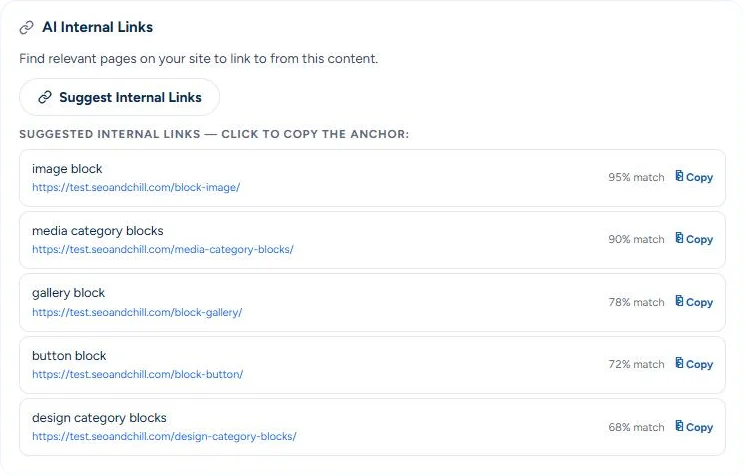
Internal linking is the highest-leverage SEO work almost nobody does, because it means remembering everything you already wrote, every time you publish. So new posts go live without links, and what you wrote last month sits unread.
An interactive preview with sample data. The real thing runs inside your WordPress admin.
The opening of the post you edit is enough to find related pages. The rest of it is not sent to the AI.
Picked from your 30 newest posts and pages, each with a match score.
Every suggestion comes with anchor text. You choose where the link goes.
The suggestions come from the AI you connected: OpenAI, Claude, Gemini or one of the others.
One click in a new post gives you pointers to related posts you published lately.
Connect buying guides to related posts and pages. Product pages aren’t suggested, so link those yourself.
Give each new post on a client site a shortlist of links to review. Nothing on the site changes until you add a link.
No. It suggests 3 to 5 pages, each with anchor text and a match score, and you add the links yourself. That keeps editorial control where it belongs and means no surprise edits on client sites.
The AI suggestions come with Pro and Agency. In the free version and on every plan, the Analysis tab of the SEO box lists up to five related posts without AI: posts and pages that match your focus keyword first, then posts from the same category, and posts that already link to this one.
It can. The AI sees the titles and addresses of your other pages, not their text. Each suggestion comes with a match score, the AI’s own estimate, and you skip what doesn’t fit. The point is a shortlist worth reviewing, not a bulk edit.
Its text never goes to the AI. You get up to five of the newest posts from the same category instead, without a match score.
It suggests links to posts and pages only, from the 30 most recent. Products and other custom post types are not suggested as targets. You can run it from any post type with the SEO box, products included.
That’s the job of Old Links & Redirects. Old links that lead nowhere are logged with a suggestion where to send them, and one click turns them into redirects.
Let it fill in what’s missing. You check. It types.
Get started →
